Test Your YouTube Thumbnail Before You Publish
Preview how your video thumbnail, title, and channel compete in a real YouTube feed alongside trending content. Verify mobile truncation, test visual contrast, and maximize your Click-Through Rate (CTR).
Click to upload thumbnail
16:9 • 1280 × 720

Your video title will appear here in the live preview...
148K views • 3 days ago
Notice the 12:45 timestamp in the bottom-right corner. Avoid putting faces or text there!
Drag and drop your thumbnail here, or browse
Supports JPG, PNG, WEBP • Recommended 1280×720 (16:9)
Preview includes Desktop & Mobile toggles with live competing videos.
Need to download an existing thumbnail?
Extract high-resolution 1080p, HD, and 4K thumbnails from any public YouTube video URL in one click.
Why Successful Creators Test Before Publishing
Your thumbnail and title are responsible for 90% of your click-through rate. Here is what testing solves:
Feed Contrast
Thumbnails don't exist in a vacuum. Check if your colors, borders, and subjects pop out against competing videos in the YouTube feed.
Mobile Screen Test
Over 70% of YouTube viewership is on mobile. Ensure your thumbnail text and focal points remain razor sharp and readable on tiny screens.
Duration Badge Shield
YouTube places a dark timestamp badge in the bottom-right corner. Previewing protects your face or text from being blocked.
Title Cutoff Prevention
Mobile YouTube cuts off titles at around 50–55 characters. Make sure your hook keywords aren't hidden behind an ellipsis.
How To Use The Thumbnail Tester
Follow this 3-step workflow before you upload your video to YouTube Studio.
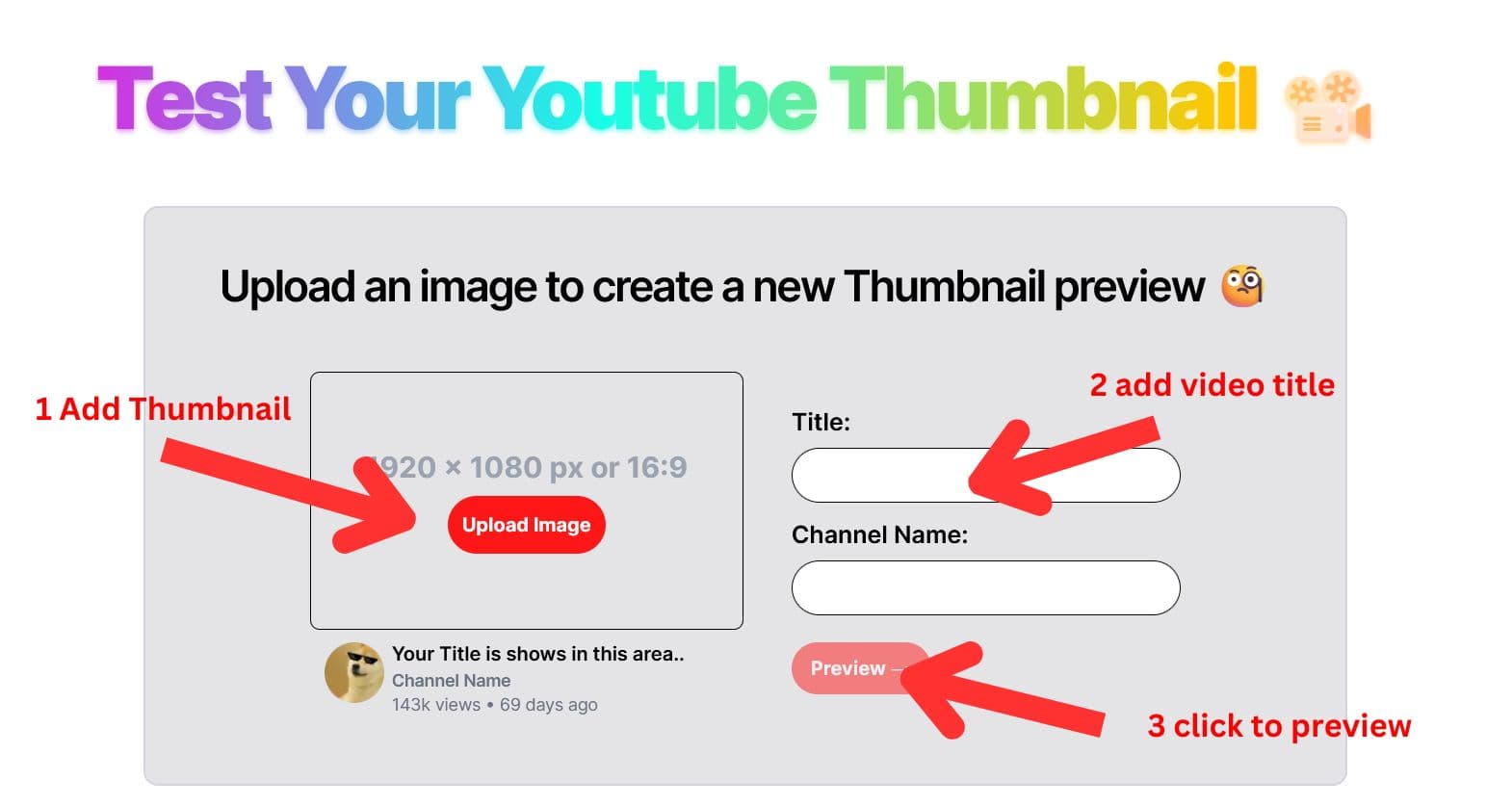
Enter Your Title & Upload Your Thumbnail
Type in your proposed YouTube title and channel name. Drag and drop your thumbnail image (16:9 ratio, 1280×720 recommended). Look at the instant card preview on the left to confirm your layout looks balanced.
Inspect Your Thumbnail Inside The YouTube Feed
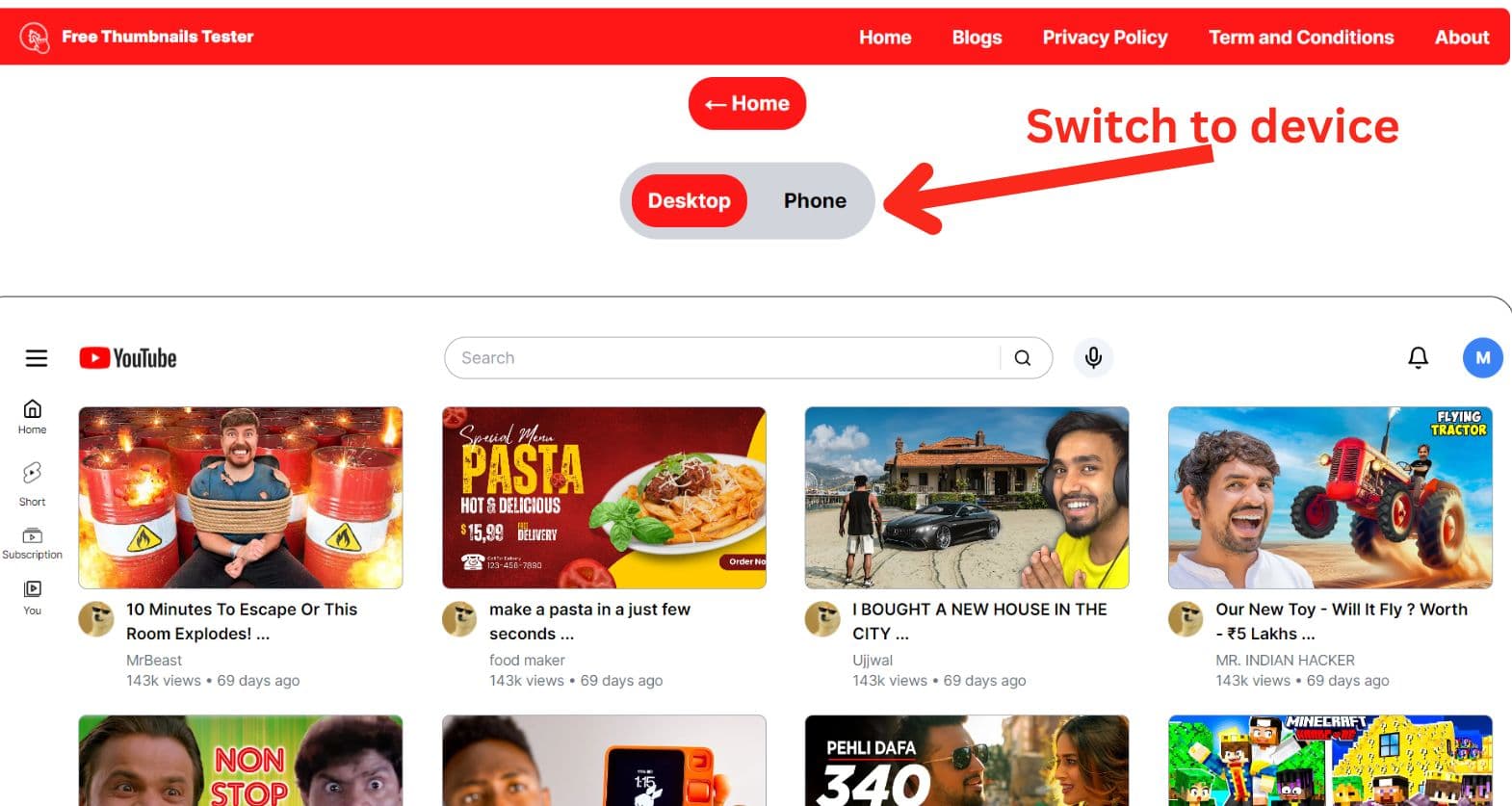
Click “Preview in YouTube Feed”. You will be transported to a simulated YouTube homepage where your video sits right alongside real trending content. Toggle between Desktop and Mobile views.
Refine Contrast & Publish With Confidence
Ask yourself: Does my thumbnail catch the eye first? Can I read the title in 1 second? Is any important face or graphic hidden? If needed, make quick tweaks in your graphic tool and re-test until you're completely satisfied.
The Complete Guide to YouTube Thumbnail Testing & CTR Optimization
Why top YouTubers spend up to 50% of their creative time perfecting thumbnails—and how small visual adjustments multiply views.
How the YouTube Recommendation Algorithm Leverages CTR
When you publish a new video, YouTube's algorithm does not immediately show it to millions of viewers. Instead, it tests the video with an initial “seed audience” across their Homepage, Suggested Videos rail, and Subscription feeds.
The algorithm measures two foundational metrics:
1. Click-Through Rate (CTR)
The percentage of people who saw your thumbnail (impressions) and chose to click. A higher CTR proves to the algorithm that your packaging is compelling.
2. Average View Duration (AVD)
How long viewers stick around after clicking. If your thumbnail creates strong curiosity without deceiving viewers, retention stays high.
If your video achieves an above-average CTR during this test window, YouTube automatically pushes it to wider audiences in Browse and Suggested features. Increasing your CTR from 4% to 8% doesn't just double your views—it frequently 5x to 10x your algorithmic impressions.
Official YouTube Thumbnail Technical Specifications (2025 Standard)
Use this quick reference table to ensure your thumbnail graphics meet YouTube's exact encoding standards without compression penalties.
| Specification | Recommended Value | Why It Matters |
|---|---|---|
| Recommended Resolution | 1280 × 720 pixels | Optimal balance between high-density Retina displays and file size limits. |
| Minimum Width | 640 pixels | Images under 640px will suffer severe blurring and upscaling artifacts. |
| Aspect Ratio | 16:9 widescreen | Standard YouTube video player ratio. Non-16:9 images create black pillar bars. |
| Maximum File Size | 2 Megabytes (MB) | Files exceeding 2MB will be rejected by YouTube Studio during upload. |
| Supported Formats | JPG, PNG, GIF, WEBP | JPG is best for complex photographic images; PNG is ideal for sharp graphic text. |
| Bottom-Right Safe Zone | Leave 180 × 60px clear | YouTube overlays a black video duration timestamp that conceals graphics. |
The 4 Critical Tests Every Creator Must Run Before Uploading
Test 1: The “Squint Test” for Mobile Feed Scalability
Over 70% of YouTube views occur on smartphones where a thumbnail measures less than 2 inches wide. Close your eyes halfway or scale your image down to 10% size. Can you still immediately distinguish the primary subject, human facial expression, and main headline word? If the image turns into an unrecognizable blur, simplify the composition immediately.
Test 2: The Feed Competition & Contrast Test
A thumbnail never appears on a blank canvas. It is surrounded by high-budget thumbnails with extreme saturation, glowing borders, and high-contrast facial cutouts. Placing your thumbnail in our live simulated feed lets you see whether your color palette blends into the crowd or grabs the eye first.
Test 3: The Timestamp Overlay Shield
Every video on YouTube features a dark, semi-translucent timestamp badge in the bottom right corner (e.g., “12:45” or “1:04:12”). Thousands of creators inadvertently position their channel logo, text punchline, or face right beneath this badge. Our preview displays the timestamp indicator so you can adjust your framing before publishing.
Test 4: The Mobile Title Truncation Test
On desktop, YouTube displays 70–80 characters of your title. On smartphones, titles are routinely cut off around 50–55 characters with an ellipsis (...). If your main hook word appears at character 65, mobile users will never see it. Our tool provides live character tracking and warns you if your title risks truncation.
Psychological Triggers Behind High-CTR YouTube Thumbnails
Top creators like MrBeast, Ryan Trahan, and Mark Rober don't rely on luck. They systematically apply cognitive psychology to their thumbnail designs:
- The Gaze Direction Trigger: Humans instinctively look where other humans are looking. If your thumbnail subject is looking directly toward your text or key object, viewers' eyes will naturally follow their gaze.
- Complementary Curiosity: Never duplicate your title text in your thumbnail. Use the thumbnail to display a puzzling or dramatic scenario, and use the title to establish the context.
- High Saturation & Color Grading: YouTube's UI is neutral white and dark charcoal. Saturated primary colors (especially vibrant red, lime green, and electric yellow) trigger immediate ocular focus.
- The 3-Element Limit: Never include more than 3 visual components: 1 face/subject + 1 focal object + 1 short text phrase. Anything more creates visual noise.
5 Best Practices For High CTR Thumbnails
Backed by YouTube algorithm insights and analytics from top creators.
Complement, Don't Duplicate
Never put the exact same words from your title onto the thumbnail. Use the thumbnail to trigger curiosity and the title to explain the context.
The 3-Second Glance Rule
Viewers decide whether to click in less than 2 seconds. Keep text under 4 words and make facial expressions prominent and emotive.
High-Contrast Color Palette
YouTube's UI is predominantly white and dark gray. Saturated yellows, greens, and vibrant reds create instant contrast against the background.
The Rule of Thirds
Place key focal elements (faces, surprising objects) along natural visual grid lines and leave breathing room so the thumbnail doesn't feel cluttered.
Everything You Need to Know About YouTube Thumbnails
Detailed answers to common questions about CTR optimization, dimensions, and testing.